


Clay and Buck
4.563.00 Reviews
App Specs
- Version
- 2.5.17
- Updated On
- License
- Free
- Downloads
- 10,000+
- Developer
- Premiere Radio Networks, Inc.
- Categories
- News & Magazines
- Platform
- Android
Screenshots



 Analysis by AppCompare
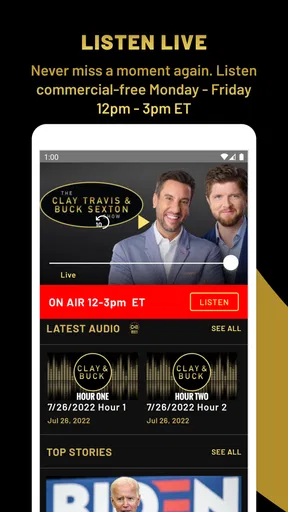
I found Clay and Buck most useful as a focused way to follow a talk-radio news program when I wanted commentary rather than a fast list of headlines. The app sits in the News & Magazines category, and its central appeal is simple: it brings Clay Travis and Buck Sexton’s daily discussion into a mobile format that is easy to open when I have a few spare minutes. I would recommend it to listeners who already enjoy opinion-led news and want a dedicated place to keep up with the show.
My experience was shaped as much by the network connection as by the content itself. This is not the kind of app I would choose when I need a complete offline reading archive or a broad, neutral news dashboard. It works best when the phone can maintain a dependable connection and when I am comfortable listening to a particular editorial point of view. That distinction matters, because the app’s convenience comes from immediate access, while its usefulness depends on how and where I plan to use it.
What the app is really for
The developer, Premiere Radio Networks, Inc., has kept the product’s purpose narrow rather than turning it into a crowded portal. The short description is simply “Clay and Buck,” while the longer store summary presents the hosts as voices breaking down the day’s news. In practical terms, I see it as a companion for the program, not a replacement for every news source on my phone.
That focused design can be a strength. When I open it, I already know what kind of material I am looking for: political discussion, reactions to current events, and the conversational rhythm associated with the show. I do not have to sort through sports scores, local weather, technology stories, or a long list of unrelated publishers. If I want this particular program, the app gets me closer to it than a general news reader would.
It is also important to understand the difference between information and interpretation. A general news app may give me several reports about the same event, while Clay and Buck is built around the hosts’ presentation and analysis. I would use it to hear a perspective and follow the show’s conversation, then turn to more varied sources when I need confirmation, local reporting, or a wider range of opinions.
How connectivity changes the listening experience
The strongest moments come when I am already online and ready to listen. A stable connection makes the app feel direct: I can move from deciding to catch up to actually engaging with the program without first opening a browser, searching for the right page, and sorting through unrelated results. That reduced friction is the main reason I would keep a dedicated app like this installed.
The trade-off is that a connection problem becomes part of the experience. In a weak-signal area, the app is less dependable than a downloaded podcast or saved article would be. I would not make it my only source of news during a commute through inconsistent coverage, on a flight, or in a place where mobile data is restricted. Those are situations where a service designed around prepared offline content is a better fit.
Worth Reading Before You Choose

EA SPORTS FC Mobile 26 Is a Bigger Football Game, but It Takes Time

Flipboard Shows What News Apps Must Do Beyond the Feed

Switching to Android Auto Means Rethinking Your Driving Routine

Google Calendar Makes a Crowded Week Easier to Manage

Ludo King Makes the Most of the Minutes Between Plans

Baby Panda World Brings Quick Play to Modern Phones, but Its Game Library Feels Busy
A useful habit is to open the app before leaving a reliable Wi-Fi network if I know I want to listen soon. That does not guarantee that every part of the experience will remain available without a connection, so I would not treat it as an offline strategy. It simply gives the app the best chance to load normally before I move into a less predictable network environment.
Everyday mobile situations where it fits
I can imagine using it during a morning routine: while making coffee, getting ready, or handling simple household tasks, I would open the app and listen rather than stare at a screen. It also suits a short break when I want more context than a headline but do not have time to read several long articles. The spoken format is especially convenient when my hands and eyes are occupied, provided I am somewhere safe to listen.
For driving, I would treat it as an audio companion and keep attention on the road. The app’s value in that setting is not visual browsing; it is the ability to follow a discussion without repeatedly checking a display. Still, I would avoid interacting with the phone while moving. Starting the content before departing is a smarter workflow than trying to search, skip, or troubleshoot in traffic.
It can also work well for someone who follows the show in more than one place. I might listen at home on a Wi-Fi connection, then check in again over mobile data later. That flexibility is useful, but it makes data awareness important. Long listening sessions can consume more of a mobile plan than a quick headline check, so I would reserve extended use for Wi-Fi when possible.
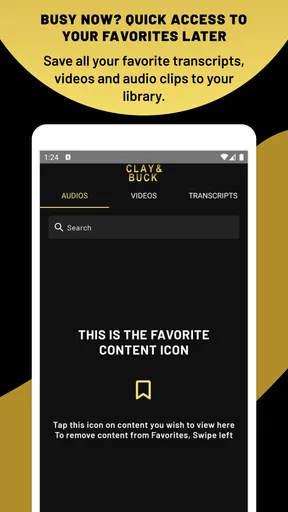
On the other hand, I would skip this app if I mainly read news in silence, need transcripts, or prefer to scan many sources quickly. A text-first aggregator is more efficient for comparing headlines. A podcast application may be better for listeners who want a familiar queue, downloads, playback controls, and a broader library. Clay and Buck makes the most sense when the show itself is the reason I am opening the phone.
Recovering when the connection gets in the way
Connectivity failures are rarely dramatic, but they can interrupt the exact moment when I have time to listen. If content does not load, my first step would be to check whether other online apps are working. That quickly separates a general network problem from an issue limited to this app. I would then try a stronger Wi-Fi signal or switch to mobile data if my plan allows it.
Another practical approach is to avoid repeatedly tapping the same control while the connection is struggling. That can create confusion about whether the app has responded. I prefer to wait briefly, return to the previous screen, and try again once the network is stable. If the problem continues, closing and reopening the app is a reasonable basic recovery step before deciding that the service itself is unavailable.
Because I would not assume offline access, I would plan around interruptions rather than depend on recovery at the last second. For example, if I want audio during a long journey, I would prepare another listening option in advance. This is a key limitation for people who expect every radio companion app to behave like a download-based podcast player. The app may be convenient for connected listening, but convenience is not the same as guaranteed continuity.
Version 2.5.17 is the current version shown for the app, and it supports Android 7.0 or later. That makes it accessible to people using older Android phones, although compatibility alone does not solve network limitations. If the phone is old, I would also leave enough room for the app and the operating system to function comfortably, especially if I am switching between it and other demanding apps during a listening session.
Keeping mobile data under control
The app is free to install, which lowers the barrier for someone who wants to try the show without committing money first. However, the listing also shows in-app purchases ranging from $6.99 to $49.99 per item. I would therefore pay attention to any purchase screen and avoid assuming that every possible part of the wider experience is included at no cost. The free starting point is attractive, but it is still worth reading the wording before confirming a transaction.
For data-conscious listeners, the most important decision is when to use Wi-Fi. I would make longer sessions part of my home or office routine and use mobile data for shorter check-ins. If the app offers any playback or content choices on screen, I would review them before beginning a long session rather than discovering later that my phone has been using cellular data for an extended period.
I would also keep the phone’s own data controls in mind. Android’s per-app usage tools can show whether this app is consuming more data than expected, which is more reliable than guessing from one short listening session. Setting a warning for the billing cycle is useful if I frequently listen away from Wi-Fi. This is not a special feature of Clay and Buck, but it is a sensible way to make a connection-dependent news app fit a limited plan.
Battery use is another mobile consideration. Streaming spoken content for a long time can keep the phone active, particularly when the screen remains on. I would start playback, lock the display if the app allows normal background listening, and carry a charger on longer trips. If the audio stops whenever the screen locks, that would make the app less convenient for hands-free use and would be a meaningful reason to choose a different audio platform.
Who will appreciate the format
The app has an average rating of 4.5 from around 153 ratings, with around 63 written reviews, and it has passed 10K+ installs. Those figures suggest a modest but engaged audience rather than a mass-market news platform. I would read that as a sign that the app serves a specific listener well, not as proof that its editorial approach will suit everyone.
That audience is likely to include people who already recognize the hosts, enjoy spoken commentary, and want a simple mobile route to the program. It may also suit a listener who finds general news apps too busy and wants one familiar show instead. The Everyone content rating makes it broadly approachable from an age-label perspective, though the subject matter can still involve serious or politically charged news, so personal taste matters more than the label alone.
I would be more cautious about recommending it to someone who wants strict neutrality, extensive international coverage, local reporting, or a customizable mix of publishers. The app’s identity is tied to its hosts, and that is both the reason to use it and the reason not to. If I want a balanced overview, I would pair it with outlets that report independently. If I want a neutral briefing with minimal commentary, I would choose a different news product altogether.
How it compares with familiar alternatives
Compared with a standard news aggregator, Clay and Buck is narrower but more coherent. An aggregator gives me breadth and lets me compare outlets, while this app gives me a consistent program and recognizable voices. I would choose the aggregator when researching a developing story and this app when I want to hear how the hosts frame the day’s events.
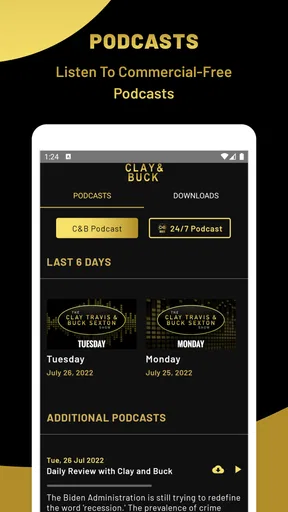
Compared with a podcast app, the distinction is less about the subject and more about workflow. Podcast apps are usually built around subscriptions, queues, downloads, and managing many shows. This dedicated app is more appealing when I do not want to maintain a large audio library and simply want the Clay and Buck experience in one place. If I already have the program organized in my preferred podcast player, installing another app may add little value unless this version offers something I specifically want.
Compared with a live radio stream, a dedicated app can feel more intentional because it is centered on one program rather than a full station schedule. Yet a radio service may be better for someone who wants continuous programming before and after the show. The right choice depends on whether I value the program itself or the broader station experience.
Small habits that make the app more useful
I would begin by using it at home over Wi-Fi, not by making it part of a data-heavy commute immediately. That gives me time to understand how quickly content loads, how the controls behave, and whether the listening flow matches my expectations. It is a simple test, but it prevents a frustrating first impression caused by a weak mobile signal.
Next, I would use it for a defined purpose rather than leaving it open as background noise all day. A short morning catch-up or a planned listening window makes it easier to manage data, battery, and attention. It also helps me judge whether the commentary is adding value or whether I would rather spend that time comparing written reports.
My third tip is to keep a second source for verification. When a discussion prompts me to learn more about a major event, I would search for reporting from another outlet instead of treating a single program as the entire news picture. That is not a criticism unique to this app; it is the sensible way to use any opinion-centered news source. The app works best as one voice in my routine, not as my only window on current events.
Finally, I would watch purchase prompts carefully. Since the app is free but includes listed in-app purchase items between $6.99 and $49.99, I would not tap through a subscription or premium offer without checking its terms and renewal details. A free download can still lead to optional paid content, and a few seconds of attention at that point avoids an unpleasant surprise.
My final view on connected listening
Clay and Buck is a focused News & Magazines app for people who want this particular talk-radio program on a phone. I like its clear identity and the way it can fit into hands-free moments at home, during a break, or before a drive. Premiere Radio Networks, Inc. has a product here that is easier to understand than a sprawling news portal: open it for Clay and Buck, listen when the connection is ready, and use other sources when you need breadth.
The main limitation is equally clear. I would not rely on it as an offline news library, a neutral news aggregator, or a complete replacement for a podcast service. Its best experience depends on connectivity, and long mobile sessions deserve attention if data or battery life is limited. For the right listener, those are manageable trade-offs. For someone seeking downloaded audio, multiple publishers, or quick text scanning, another app will be more practical.
My recommendation is therefore conditional but positive: try it if the hosts’ style is already what you want and you usually listen while connected. Start over Wi-Fi, monitor how it fits your daily routine, and keep a broader news source alongside it. Used that way, Clay and Buck is a convenient dedicated companion rather than an all-purpose news solution, and that focused role is where it makes the strongest case for staying on my phone.
Pros
- Free access to live Clay Travis and Buck Sexton radio content.
- Strong focus on conservative news
- politics
- and opinion commentary.
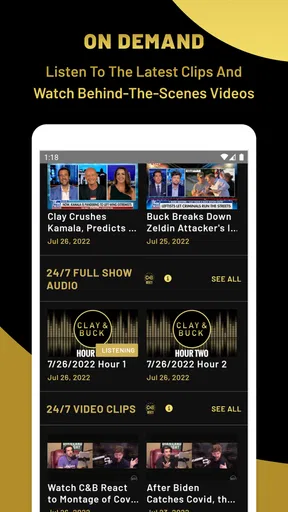
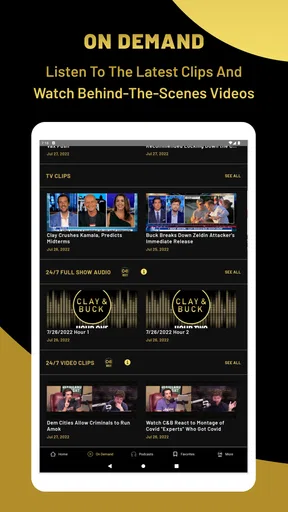
- On-demand episodes make it easy to catch up on missed broadcasts.
- Push notifications can alert listeners to new shows and updates.
- Simple layout makes browsing programs and audio content straightforward.
Cons
- Content is highly political and may not suit listeners seeking balanced coverage.
- Some features may depend on an active internet connection.
- Audio playback can be affected by ads
- buffering
- or connection quality.
- The app may offer limited value to users outside the show's target audience.
- Frequent notifications may feel intrusive if not adjusted in the settings.
FAQs for Clay and Buck
What is the Clay and Buck app?
Clay and Buck is a talk-radio and podcast-style app centered on the Clay Travis and Buck Sexton show. It gives listeners access to political commentary, interviews, current-events discussions, and selected show content in a mobile format. Depending on the version and region, the app may also provide live listening, replayed segments, podcasts, articles, notifications, and links to related station or network content.
Can I listen to Clay and Buck live through the app?
The app may allow you to listen to the Clay and Buck program live, but availability can depend on your location, the participating radio station, and the app’s current features. In some areas, users may primarily receive on-demand episodes or podcast segments instead. Before downloading, check the app description and station listings to confirm whether live streaming is supported where you live.
Is Clay and Buck free to download and use?
Clay and Buck can generally be downloaded without an upfront charge, although some features may depend on internet access, advertising, station availability, or third-party services. Listening over mobile data can still create costs through your carrier. The app may also include links, promotions, or optional features that have separate terms, so reviewing the store listing and privacy information is recommended before regular use.
Does the app support podcasts or offline listening?
The app may include on-demand show episodes, clips, or podcast feeds that let you catch up when you are unable to listen live. However, offline playback and direct downloads are not guaranteed for every version of the app. If offline access is important to you, verify whether episodes can be downloaded inside the app, rather than assuming that every available program can be saved for later.
What permissions and privacy considerations should I know about?
Like many media and radio applications, Clay and Buck may request permissions related to internet connectivity, notifications, approximate location, analytics, or advertising. Some permissions support station discovery, alerts, personalization, or measurement, while others may be optional depending on your device. Before installing, review the current Google Play or App Store privacy details and disable permissions that are not necessary for your preferred listening experience.


